
5 After Effects Tips Every Beginner Should Know
Whether you're just getting started with After Effects or looking to sharpen your fundamentals, these five tips will help you work faster and create better animations. Let's dive in.
1. Learn the Keyboard Shortcuts
This might sound obvious, but mastering keyboard shortcuts is the single biggest productivity boost in After Effects. Here are the essentials:
- U — Reveal all keyframed properties
- J / K — Jump between keyframes
- Ctrl+D — Duplicate layer
- ` (backtick) — Full-screen preview
- Ctrl+Shift+C — Pre-compose
Spend a week forcing yourself to use shortcuts instead of menus, and you'll never go back.
2. Use the Graph Editor
The default keyframe interpolation in After Effects creates robotic, linear motion. The Graph Editor lets you control the velocity curves of your animations, making them feel natural and polished.
To open it, click the graph icon in your timeline panel. Select your keyframes and drag the bezier handles to create smooth ease-in and ease-out curves.
Pro tip: Use our Easing Curve Editor tool to preview and copy easing values before applying them in AE.
3. Pre-compose to Stay Organized
As your projects grow, your timeline becomes a mess. Pre-composing (Ctrl+Shift+C) lets you group layers into nested compositions, keeping your workspace clean.
Think of pre-compositions like folders, group related elements together and give them descriptive names.
4. Master Expressions (Start Simple)
Expressions unlock a whole new level of animation control. Start with the basics:
loopOut()— Loops any animation infinitelywiggle(freq, amp)— Adds organic randomnesstime * speed— Continuous rotation or movement
You don't need to be a programmer. Start by copy-pasting expressions and tweaking the numbers to see what happens.
Recommended Plugin
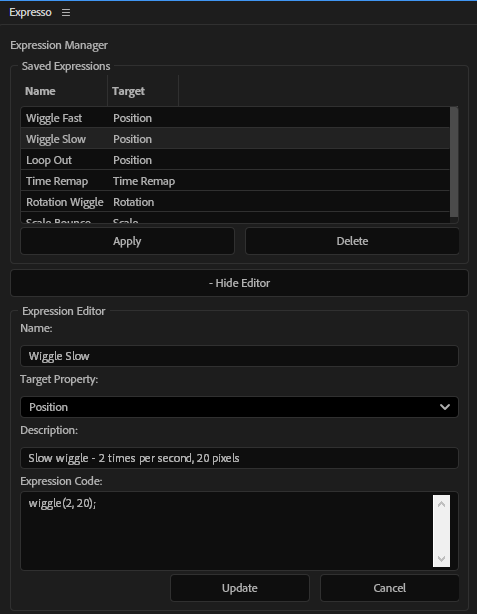
Expresso
Save and apply your favorite expressions with one click. Build a personal expression library inside After Effects.
5. Use Plugins to Speed Up Repetitive Tasks
Some tasks in After Effects are tedious and repetitive — resizing compositions, managing safe zones, reformatting for different platforms. This is where plugins shine.
Instead of spending 20 minutes on manual work, a good plugin does it in seconds. Check out our marketplace for tools built specifically for motion designers.
Our site here offers a lot of free plugins for beginners!
Wrapping Up
These five fundamentals will dramatically improve your After Effects workflow. Focus on one tip per week, and within a month you'll notice a real difference in both speed and quality.
Have questions or want to see more tutorials? Let us know at support@creovanta.com.
Recommended Posts
Why is After Effects Slow (And How to Fix It)
After Effects feels slow? Learn the real causes of lag and how to fix preview, RAM, effects, expressions, and workflow issues to speed up AE. If After Effects feels laggy, stuttery, or just painful to use, you’re not alone. The good news: most slowdowns come from a few common bottlenecks - and fixing them can dramatically speed up your workflow. This guide breaks down the real causes and how to fix them.
10 After Effects Tricks That Will Save You HOURS
Most beginner After Effects users waste time doing things manually that can be automated or simplified. These are practical tricks that speed up real workflows.

How to Preview TikTok & Reels Safe Zones in Premiere Pro
Stop guessing where your text gets cut off. Learn how to preview exactly how your video looks on TikTok, Reels, and Shorts before you export, directly inside Premiere.