

How to make Bouncing Ball animation with an Expression in AfterEffects (No Keyframes!)
To achieve bouncing animation with Expression, copy this code and paste it into position keyframe (right-click the clock icon):
`// ===== Bouncing Ball — driven by two Point Controls on this layer =====
var p0 = effect("Start")("Point"); // start point (top)
var p1 = effect("End")("Point"); // ground / landing point
// ---- Tweakables ----
var numBounces = 7; // how many bounces before it settles
var delay = 0; // seconds to wait before it starts
var grav = effect("Gravity")("Slider");
var bounce = effect("Bounce")("Slider");
var t = time - inPoint - delay; // local time
if (t < 0) {
p0; // hold at start
} else {
var h = p1[1] - p0[1]; // drop height
if (h <= 0) h = 100; // safety if End is above Start
var v     = Math.sqrt(2 * grav * h); // impact velocity
var tFall = v / grav;                // time of first fall

// total flight time (for horizontal pacing)
var tTotal = tFall, vb = v * bounce;
for (var i = 0; i < numBounces; i++) { tTotal += 2 * vb / grav; vb *= bounce; }

// horizontal: constant-velocity slide Start.x -> End.x
var x = linear(clamp(t, 0, tTotal), 0, tTotal, p0[0], p1[0]);

// vertical: find which arc we're in
var y;
if (t < tFall) {
    y = p0[1] + 0.5 * grav * t * t;          // first fall
} else {
    var tt = t - tFall, vv = v * bounce, hit = false;
    for (var i = 0; i < numBounces; i++) {
        var tb = 2 * vv / grav;              // this arc's duration
        if (tt < tb) {
            y = p1[1] - (vv * tt - 0.5 * grav * tt * tt);
            hit = true; break;
        }
        tt -= tb; vv *= bounce;
    }
    if (!hit) y = p1[1];                     // settled
}
[x, y];
}`
Recommended Plugin
Expresso
Free After Effects expression manager—42 built-ins, parameterized expressions, import/export packs.
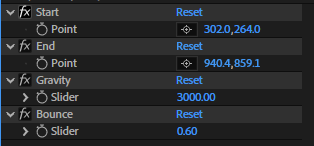
After that, add 2 [Point Control] properties, name them as the following: "Start", "End" (case sensitive). These will behave as start and end points for the animation.
Also add 2 [Slider Control] properties, "Gravity" and "Bounce".
Gravity: the gravity of the ball, higher = heavier, faster drop. Recommended: 3000
Bounce: elasticity 0–1 (energy kept per bounce), Recommended: 0.6. Don't go over 1 or the ball will bounce higher after each drop!
As a bonus, you can also make the ball squash & stretch, copy and paste this Expression in Scale property:
`// ===== Squash & Stretch with impact flatten =====
var intensity = 1.0; // overall amount
var stretchAmt = 0.1; // air stretch
var squashAmt = 0.2; // impact flatten
var sensitivity = 3000; // speed -> full deform
var contactDist = 30; // px from ground that counts as "contact"
var groundY = effect("End")("Point")[1];
var posY = transform.position[1];
var vy = transform.position.velocity[1];
var s;
if (posY >= groundY - contactDist) { // touching ground = squash
s = -clamp(Math.abs(vy)/sensitivity, 0, 1) * squashAmt * intensity;
} else { // in air = stretch
s = clamp(Math.abs(vy)/sensitivity, 0, 1) * stretchAmt * intensity;
}
[ 100 / (1 + s), 100 * (1 + s) ];`
You can alter the variable as you'd like too.
And you're done! Set the start and end points where you like and the ball will drop and bounce with real physics, all with zero keyframes.
Recommended Posts
How to Add YouTube Chapters from Premiere Pro (2026 Guide)
Learn how to add YouTube chapters from Premiere Pro using sequence markers — and how to export perfectly formatted timestamps in one click.

Why is After Effects Slow (And How to Fix It)
After Effects feels slow? Learn the real causes of lag and how to fix preview, RAM, effects, expressions, and workflow issues to speed up AE. If After Effects feels laggy, stuttery, or just painful to use, you’re not alone. The good news: most slowdowns come from a few common bottlenecks - and fixing them can dramatically speed up your workflow. This guide breaks down the real causes and how to fix them.
10 After Effects Tricks That Will Save You HOURS
Most beginner After Effects users waste time doing things manually that can be automated or simplified. These are practical tricks that speed up real workflows.